Robot Description and Function:
The robot is the default configuration of a TurtleBot3 Waffle bot, it is a small flat robot consisting of 2 wheels to control the robot, on its top it contains both a LIDAR and RGB camera. The main functionality of this bot will be to recognize people and their faces, and then follow the person. If the robot detects that the person is facing the robot, the robot will come to a stop, and remain stopped till the person has turned away. While following the person, the robot should be able to avoid obstacles in its path and try to maintain visual contact with the person.Due to limitations with tracking reliability and image processing runtime, the robot will maintain a set speed of 0.2 m/s when it is moving.
Person/Facial Recognition
In the simulation, we have a Turtlebot3 Waffle robot with a camera on the font of it, and a fully mobile and animated humanoid model. The human model walks in a predifined path, while the robot follows it around the room. A ROS node subscribes to the image topic produced by the robot’s camera, and processes it using a convolutional neural network to detect the position of faces and people in the image. If the processing node detects a person, but not a face in the robot’s camera image it will publish cmd_vel topics to the robot that tell it to follow the person. If the node detects a face in the camera image, it will publish cmd_vel commands telling the robot to stop in place. If the robot detects no people or faces in the camera image, it will publish commands that tell the robot to wander around the map as if to search for new victims.
Model Description
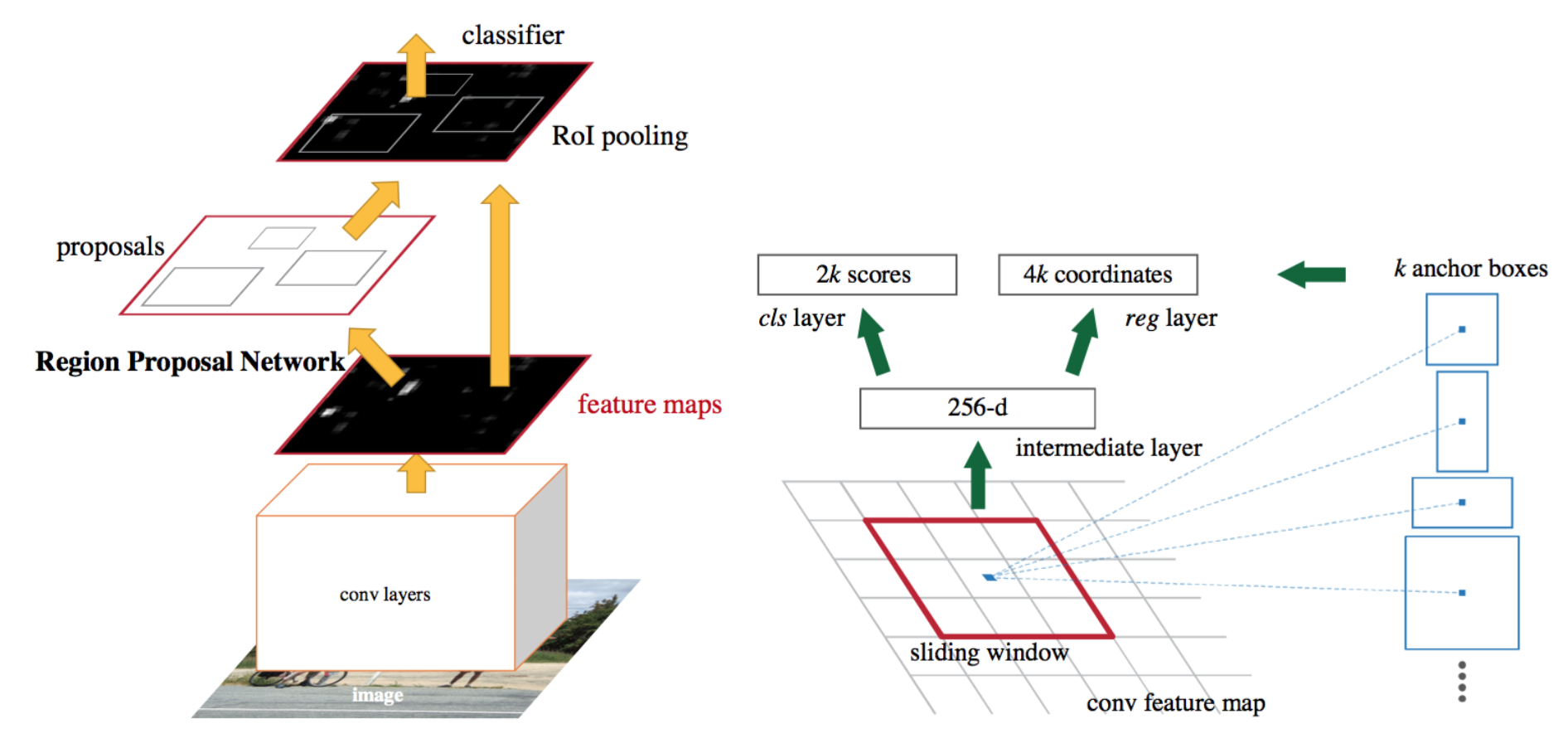
The main algorithm for box segmentation of the Gazebo human model’s body and face is implemented with a FasterRCNN from pytorch. For this application the model was fine tuned on just 2 categories: people and faces.
Fine tuning is a practice used in transfer learning, where models that are pretrained for general tasks are allowed to keep their low level layers, and their later layers are trained on a specific dataset.
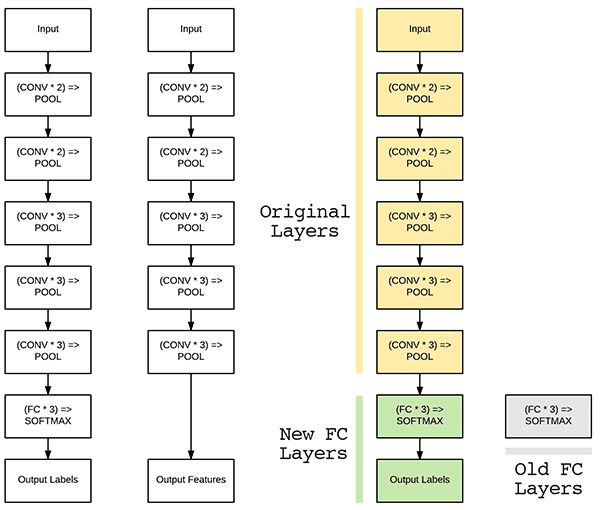
This works because of the way that neural networks process images. In a neural network, the early layers create representations for simple patterns in the image, such as curves and edges. In the later layers the model starts to be able to recognize higher level points of interest in the image, such as features of the objects that it has been trained to classify and recognize.

With the pretrained Residual Convolutional Network which is the backbone of the FasterRCNN, it is assumed that the model can already recognize faces because it has been trained to recognize people, and the face of a person may be a key factor in determining if there is a person in the section of the image. However, the model has not been trained to specifically recognize faces despite the fact that it likely already recognizes them as a unique feature of a person.
With this assumption, we can simply use the pretrained convolutional network and retrain the RoI detector to output the bounding boxes of faces and people in the image with a minimal amount of fine-tuning.
The higher layer classifier of the model was replaced with newly initialized weights and trained on the 2 categories over 10 epochs.
Model Training and Deployment
Training
- The person and face detection in this program is performed by a FasterRCNN with a ResNet-50 as the backbone convolutional network. The model itself is loaded from the pytorch module for the FasterRCNN.
- The FasterRCNN is pretrained on the COCO dataset, which contains thousands of images of objects from 80 different categories. Each object of a category in each image is annotated with a segmentation mask and a bounding box, as well as the category that it fits into.
- The FasterRCNN was fine-tuned on the faces4coco dataset, which annotates all of the COCO images with bounding boxes of only people and faces.
- A detailed tutorial for how to fine tune a pytorch model can be found here on pytorch’s website.
- The code for fine tuning the model for this dataset can be found here. You will need to have all necessary dependencies.
- The FasterRCNN was trained on the validation set of the faces4coco dataset over 10 epochs.
- System Specs
- AMD Ryzen9 3950x
- RTX 2070 Super
- 32GB DDR4
- 2TB Nvme M.2 SSD
Model Deployment
- In the program, the model is loaded from pytorch and then the pretrained weights are imported from
model_state_dict.pth. - The detection node subscribes to the image topic published by the robot’s camera, and then the image is passed through the model. The model outputs 3 arrays which contain bounding boxes of the objects in the image, prediction scores for those objects, and then category labels for the objects detected.
- If the model detects any people in the image, then the detection node will select the person detected with the highest prediction score and then calculate the center point of the bounding box and publish it as a topic.
- If the model detects any faces in the image, then the detection node will publish a boolean topic named
face_detectedasTrue. Otherwise, it will publishface_detectedasFalse.
Person Following
The robot achieves its ability to follow a person by using a centroid. The centroid designates the central point of a person in an image. By comparing the location data of the centroid to the image, we can get a value that represents the horizontal position of the person being followed relative to the robot. We achieved this by comparing the x-axis offset of the centroid to the center point of the camera image. With this offset determined, we can convert this offset into an angular velocity that will steer the robot in the direction of the person. This method of steering provides quite reliable results if calibrated correctly, this is due to how the steering is based off the centroid offset from the center. This naturally causes the steering values to adjust in strength based on the person’s location, as the farther from center the person is from the robot camera, the higher the offset value and thus higher the steering strength.
Object Avoidance
The robot achieves object avoidance by using the sensor data from the Wafflebot’s builtin LIDAR sensor. The object avoidance code works by first splitting the 360 degree LIDAR data into 3 parts: front, left, and right. These cones, size of which are adjustable, help determine if an object is blocking the robot’s path and which direction for the robot to turn. The code does this by comparing the minimum distance values of each cone. First to determine if there are obstacles in the robot’s path warrants the need to turn, if so it will then determine how hard it needs to steer and in which direction. We get the direction by getting the difference between the minimum values of the left and right LIDAR cones. This is based on the assumption that the side that has the largest minimum distance value will be the side in which the robot has the most room to maneuver away in. This difference comparison yields us a positive or negative integer, whose sign is used to determine the direction of turn and whose magnitude is used to determine the strength of steering.
The steering code, however, is not entirely separate from the Person following code. Since both the object avoidance and the person following both output an angular velocity value, we can combine both values together to achieve a tandem effect. This is where the object avoidance will keep the robot from a collision, while the person following will compensate to maintain visual contact with the person. Though in an ideal system these two values would always be working together, this is not always the most effective case. Due to strange obstacle geometry, the person’s movement, or changes in terrain, the code will ignore the person following steering value in situations where safe object avoidance has failed, and the robot needs to turn aways quickly to avoid collision.
Importing a Human Model into Gazebo
Importing a human model into Gazebo plays a major part in the project as we needed to find a way to compensate for the lack of access to physical components. Due to the COVID 19 Pandemic, we were limited in our ability to test our code, so the solution to this was to do all our testing in simulation. To this end we importanted a human model with walking animations into a Gazebo world to replace the need for an actual human figure. This is not to say that we did not do actual tests to see if our human recognition code worked on real life people, but the need to a 3-dimensional world for our robot to operate in meant that the human model was needed in Gazebo to properly test out robots.
Importing a human model into Gazebo is achieved by importing a .dae model into Gazebo as an actor, and assigning it the animation set embedded in the .dae model. For the human model, we used the standard walking model native to the Gazebo ecosystem, as it was the most stable and least expensive model. The walking model can be described as a bald, middle aged, cocasian man wearing a dark green shirt and dark green sweatpants.